![Beware of AI Slop: what you need to know. [ai-generated]](https://azsocialmediawiz.com/wp-content/uploads/beware-of-AI-slop-300x167.jpeg "beware of AI slop - AZ Social Media Wiz")
AI Slop happens when you let AI do its thing without human intervention. That is, careful proofreading, editing, and image examination. Keep in mind that AI has no common sense, wisdom, or compassion. It just puts out what it thinks you asked for. Here are some examples of AI Slop…
Examples of AI Slop
What’s Wrong With This Picture?
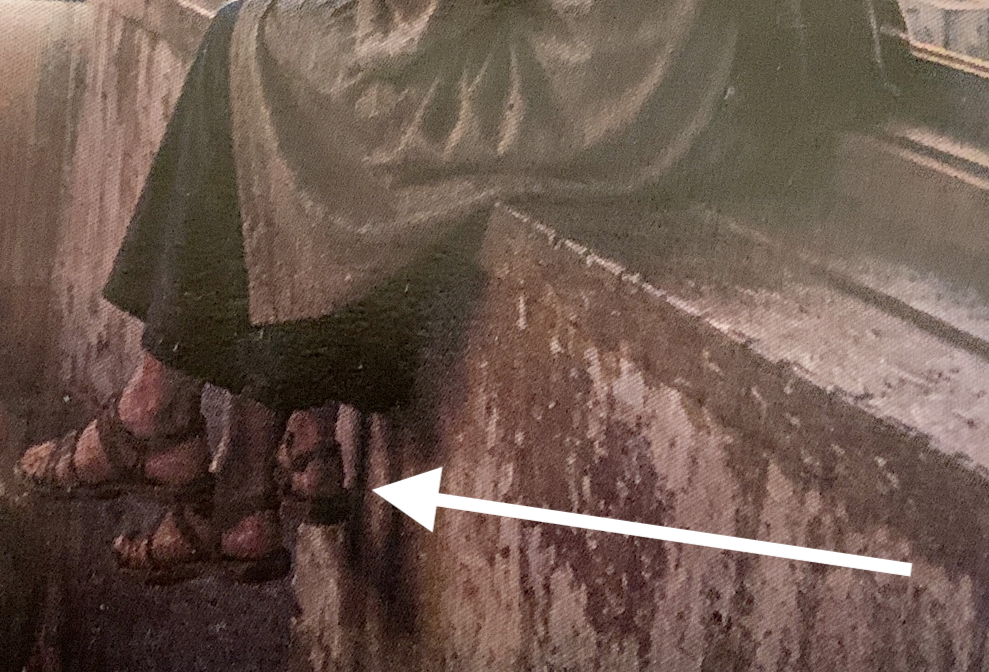
This was a printed program. I’m looking at it and notice the guy sitting on the windowsill has 3 FEET!
Maybe it’s because I have a graphic designer’s eye, but I caught it right away.
Remember the “What’s Wrong with this Picture?” games as a kid. They’re back!
Grammar Check
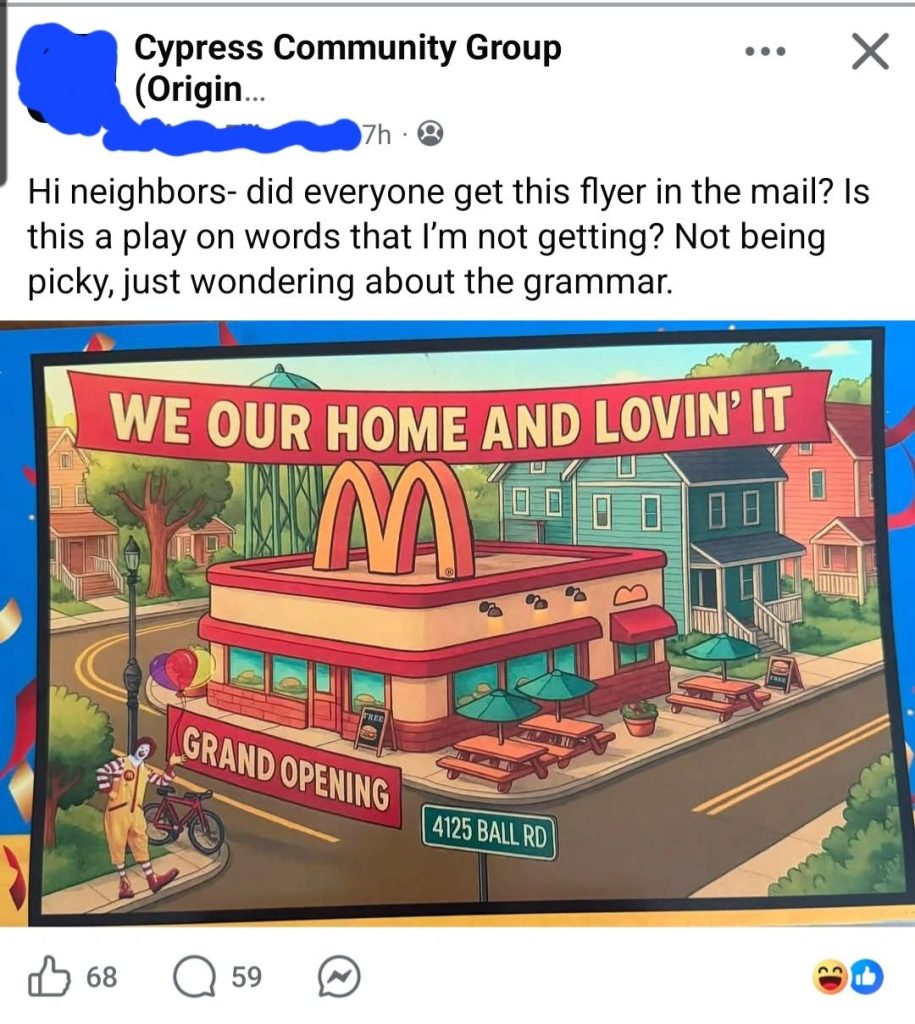
I saw this on LinkedIn. (Sorry, but I didn’t save the post, so I can’t give credit to the person who shared it.)
Apparently, this was a flyer mailed to residents near a brand new McDonald’s restaurant. They had the right idea, but the banner kind of falls short.
Maybe it was supposed to be, “We Are Home and Lovin’ It”. Or maybe, “Our New Home and Lovin’ It”?
Proofread, proofread, and proofread it again.
Another guy with 3 FEET!
This was from a video I watched. The image stayed long enough for me to notice. He has 3 FEET!
What’s with these AI programs? Didn’t the programmers teach them that people have 2 feet?
If you review the video before posting and notice AI Slop, you HAVE TO correct it. Letting mistakes like this go hurts your online image!
This is no time to be lazy!
Catching AI Slop
Use this matrix as a guide for when to use AI and when NOT to use AI…
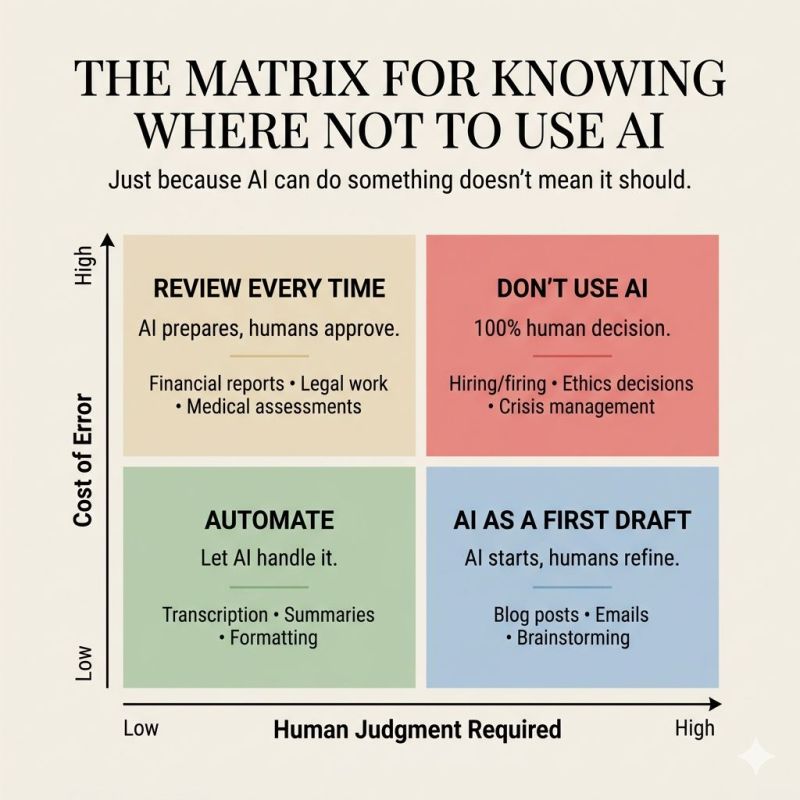

I love the tagline, and it’s so true! “Just because AI CAN do something doesn’t mean it SHOULD!
High Cost of Error:
- Review EVERY TIME: AI prepares it, humans approve it. This goes for…
- Financial reports
- Legal work
- Medical assessments
- Don’t Use AI: 100% Human Decision…
- Hiring or firing
- Ethical decisions
- Crisis management
Low Cost of Error:
- Automate: Let AI handle it. To a point. Please, if you’re going to use an AI-created document to send to someone or use a transcription for a YouTube video description, PROOFREAD IT!
- Transcriptions
- Meeting notes
- Summaries
- Formatting
- AI as a 1st draft. AI starts, then a human refines it. This is the best choice!
- Blog posts, articles, social media posts, marketing campaigns.
- Emails
- Brainstorming
Related Content: Pros and Cons of Using AI
Avoid AI Slop
I have to admit the AI tools are getting better. Last year, a graphics program I used could never get text correct in an image. After a few revisions, I gave up and left it without the text and had to add it later in another program.
I created the top graphic of this post with Google Flow, which uses Nano Banna. Infographics are also fun to create using Google NotebookLM. It took me a few tries to write the prompt to get the results I wanted. I still can’t get NotebookLM to add my logo graphic to the bottom of the infographic without it distorting it. I have to tell it to leave a black space at the bottom, then I upload it into Canva.com to add my logo to it.
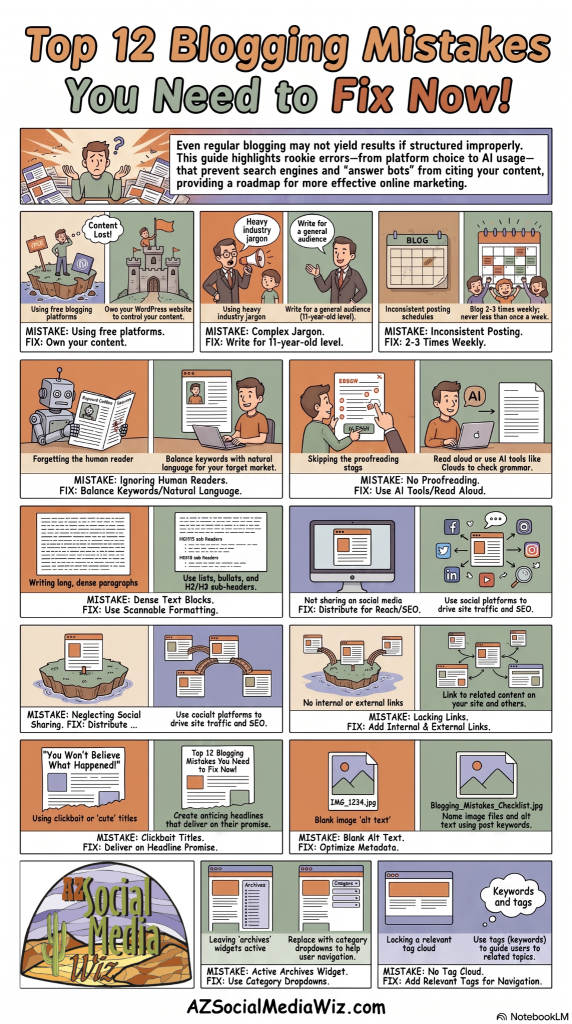
In other words, be careful when creating graphics with your branded logo! I can show you how I created this graphic as well as give you some prompt-writing tips in a customized 1:1 learning session. Click here for more info.
Why you want to avoid AI Slop
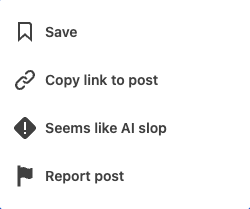
For one, Google, LinkedIn, YouTube, and other platforms are labeling 100% AI-generated graphics. LinkedIn even added an option to report AI slop!
Second, you don’t want someone to take your social media post, share it with their followers, and call you out publicly for an AI slop mistake that should have been caught by a human. Nothing like bad publicity that could have been 100% avoided!
Lastly, it’s YOUR ONLINE IMAGE! Letting AI slop go unchecked is a quick way to hurt your reputation. You don’t want that. Reputation cleaning takes a lot of time, money, and effort. Don’t be lazy. Use AI as a tool, but ALWAYS review it before posting or sending it out.

What is AI Slop and why does it matter for my business content?
AI Slop happens when you let AI do its thing without human intervention, meaning you don’t proofread, edit, or check images. It matters because AI has no common sense or compassion and can produce results that misrepresent your message or brand, hurting your online image.
How can I identify AI Slop in my posts or graphics before sending them out?
Review every piece where AI was used: check text for accuracy and tone, scrutinize images for distorted details, and confirm that the final version reflects your intended message. If something feels off, fix it before posting.
What is the recommended approach to using AI for high-stakes content like reports or branding?
Follow a high-cost-of-error rule: AI prepares it, humans approve it for items like financial reports, legal work, and medical assessments. For hiring, ethical decisions, or crisis management, avoid AI or use it only as a starting point with thorough human input.
When is it acceptable to automate with AI and when should a human be involved?
AI is good for low-cost items like transcriptions, meeting notes, summaries, formatting, blog posts, emails, and brainstorming. It should start the process, but a human should refine and approve the final output to protect accuracy and your brand.
What practical steps can I take to prevent AI Slop from harming my online image?
Always proofread AI-generated content, ensure graphics align with your branding, and be mindful that platforms label 100% AI-generated graphics. If in doubt, review twice and consider using a human touch or a 1:1 coaching session to improve prompts and results.